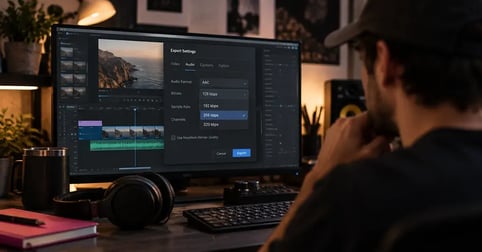
Audio bitrate is the amount of data used to represent one second of sound, measured in kilobits per second (kbps). The higher the number, the more of the original recording survives compression, and the larger the file. Video uses the same measure, counted in megabits per second.
The hard part arrives when you're staring at an export dialog with a bitrate dropdown, wondering whether 192 is fine or whether you're about to make your mix sound thin. The number matters, and it stops mattering above a certain point.
Here's what the number measures, how it differs from sample rate and bit depth, what the common values are used for, and the figures the major platforms currently ask you for.
Your export is only as good as what you put in it.
Export settings cannot rebuild what a compressed download already lost. Start from the master.
What bitrate measures
Bitrate measures how much data an encoder spends on each second of audio. A 256 kbps file uses 256 kilobits of data to describe every second of sound. It's a rate, not a total, which is why a three minute song and a three hour podcast at the same bitrate sound similar and differ enormously in file size.
kbps, Mbps, and why the unit matters
Audio is counted in kilobits per second, video in megabits per second, a gap of roughly a thousand to one. When a video export is quoted at 10 Mbps with audio at 320 kbps, those are two separate streams inside one file, each with its own budget.
How bitrate affects audio quality
Lossy encoding works by throwing away the parts of a signal it judges least audible. A lower bitrate forces the encoder to throw away more. Push it far enough and the loss stops being theoretical and becomes something you can hear on the material you worked hardest on.
Worth separating two meanings of one word here. This is data compression, which shrinks a file. It has nothing to do with compression in music, the mixing tool that controls dynamic range.
Where higher stops helping
Every lossy codec reaches a point called transparency, where adding bits no longer changes anything a listener can hear. Past that point the extra data buys file size and nothing else. This isn't a fringe position. Vimeo's compression guidelines recommend 320 kb/s while stating openly that it sits above what transparent quality requires.
Bitrate vs sample rate vs bit depth
These three get used interchangeably and they measure completely different things. Bitrate is the data spent per second of encoded audio. Sample rate is how many times per second the waveform gets measured. Bit depth is how many bits describe each of those individual samples. Only bitrate is a property of the compressed file you hand to a platform.
| Measurement | Unit | What it controls | Typical value |
|---|---|---|---|
| Bitrate | kbps | How much data survives compression | 128 to 320 kbps |
| Sample rate | kHz | The highest frequency that can be captured | 44.1 or 48 kHz |
| Bit depth | bits | The dynamic range between quietest and loudest | 16 or 24 bit |
Sample rate carries its own decision for video work, and we've covered 48kHz vs 44.1kHz sample rates separately.
Common audio bitrates and what each one is for
There's no single correct bitrate. There are working bands, and each one exists because it fits a delivery path. Speech survives compression far better than music, which is why podcast bitrates sit so much lower than music bitrates without anyone complaining.
- 64 to 96 kbps: speech, podcasts, voice. Triton Digital's bitrate guidance puts general-purpose music at 64 kbps AAC or 96 kbps MP3 for streaming, and talk content lower still.
- 128 kbps: the baseline for casual listening. Fine in the car, audibly compromised on detailed material.
- 192 to 256 kbps: the practical music range. Most listeners stop hearing a difference somewhere in here.
- 320 kbps: the top of MP3 and of most lossy formats. It is also the ceiling on how Spotify streams audio before its lossless tier takes over.
- 1,411 kbps: uncompressed CD-standard audio. The figure is just arithmetic: 44,100 samples per second, times 16 bits, times 2 channels.
- Lossless (FLAC, ALAC): variable, because nothing is discarded. The bitrate rises and falls with the music itself.
Lossy and lossless, and why the same number means different things
A bitrate figure only means something alongside its codec. AAC carries more usable audio than MP3 at the same bitrate, which is why platform specifications always name a codec next to a number rather than quoting the number alone. Lossless formats don't discard data at all, so their bitrate is a consequence of the material rather than a setting you pick.
Which container you work in is a separate decision from which bitrate you export at, and we've written about the best audio format for video editing in full.
What bitrate to use for music in a video
For video delivery you aren't choosing a listening bitrate. You're choosing what to hand a platform that will re-encode everything you upload anyway. Give it more data than it strictly needs and the transcode starts from better material, which is why the recommended figures sit above what a listener could distinguish.
| Platform | Codec | Audio bitrate | Sample rate |
|---|---|---|---|
| YouTube | AAC-LC | 384 kbps stereo, 128 kbps mono | 48 kHz |
| Vimeo | AAC-LC | 320 kb/s | 48 kHz |
| Twitch | AAC-LC | 128 kbps recommended, 320 kbps maximum | 44.1 or 48 kHz |
Those come from YouTube's recommended upload settings, Vimeo's guidelines and Twitch's broadcast recommendations as they currently stand, and they do change. The rule underneath them doesn't: every step is subtractive, so work from the highest quality source you have. That applies to your music as much as to the dialogue you recorded for YouTube, and it's worth settling before you get to adding music to a YouTube video.
Does bitrate matter if your listener is on earbuds?
The playback chain caps what any bitrate can deliver. Most wireless listening gets re-encoded over Bluetooth, which is itself lossy, so a lossless file doesn't arrive lossless at the ear. Apple says this plainly about lossless audio on its own headphones.
So here's the honest version. Once you are past the point of transparency, on the equipment most people own, bitrate is no longer the thing limiting your sound. Your room, your mic technique, your headphones for audio editing and your audio levels are all further up the list. Chasing a higher export number won't fix a mix problem.
How to check the bitrate of a file you already have
The figure is usually one click away, in the file's properties on desktop or in the clip's metadata inside most editors, alongside sample rate and channel count. Check it before you re-encode anything: exporting a 128 kbps file at 320 kbps doesn't recover what was discarded the first time.
You know the number. Now you need the music.
Search 116,000 tracks and roughly 100K sound effects, then drop one straight into your edit.
Frequently asked questions
Yes. 320 kbps is the top of the MP3 range and is transparent for most listeners on most equipment, meaning a higher number would not produce an audible improvement. It is a safe choice for music you are delivering rather than still editing.
It depends on the material. 128 kbps is acceptable for speech, podcasts and background listening, and it is audibly compromised on music with detailed high frequencies, where cymbals and reverb tails start to smear.
No. Every lossy codec reaches a point of transparency where extra bits change nothing a listener can hear, and past that point a higher bitrate only adds file size. The codec you use and the equipment your listener is on matter more than the number itself.
Bitrate is the amount of data used per second of encoded audio, measured in kbps. Sample rate is how many times per second the waveform is measured, in kHz. Bit depth is how many bits describe each individual sample, which sets the dynamic range. Only bitrate is a property of the compressed file you export.
Follow the platform you are uploading to. YouTube currently recommends 384 kbps stereo AAC-LC at 48 kHz, Vimeo recommends 320 kb/s AAC-LC at 48 kHz, and Twitch recommends 128 kbps with a 320 kbps maximum. Start from the highest quality source file you have, because re-encoding never recovers detail.