If you’ve ever found yourself deep in a late-night edit, you already know the struggle: bright screens and tired eyes.
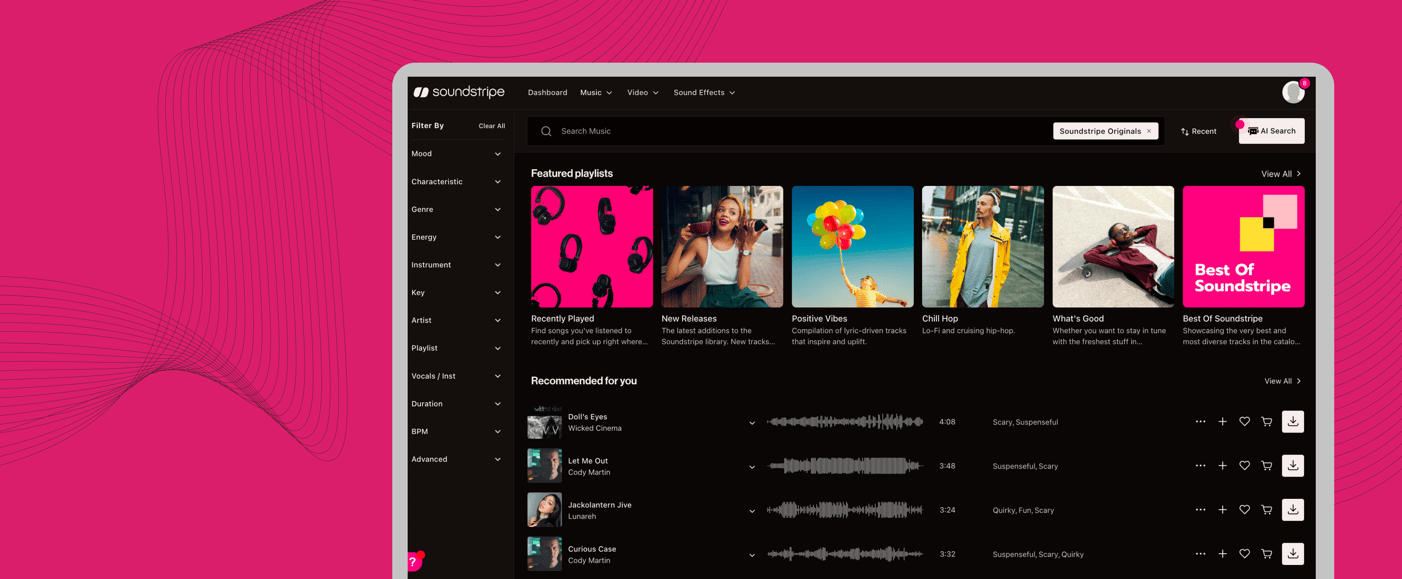
Good news — Dark Mode is officially back on Soundstripe.
Same platform. Same powerful tools. A much easier experience on your eyes.
Whether you’re working in low-light environments or you just prefer a darker interface, Dark Mode gives you a more comfortable, focused way to find, customize, and license music.
Built With Care (and Contrast)
We didn’t just darken the background and call it a day.
Dark Mode includes:
- Optimized contrast ratios for readability
- Accessible form inputs with proper color contrast
- Smooth transitions when switching between modes
How to Turn On Dark Mode
Switching is simple:
-
Click your profile avatar in the top-right corner
- Toggle Dark Mode on or off from the dropdown menu
That’s it. No reloads. No settings maze.
Once you turn it on, your preference sticks across sessions, so you don’t have to keep flipping the switch.
Dark Mode is available now for all users.
Designed for the Way You Create
From late-night edits to long music searches, Soundstripe is built for real creative workflows — and Dark Mode is another step toward making those workflows smoother.
Turn the lights down.
Turn the focus up.
We’ll see you in Dark Mode 🌙
Sound better and create faster with Soundstripe.